



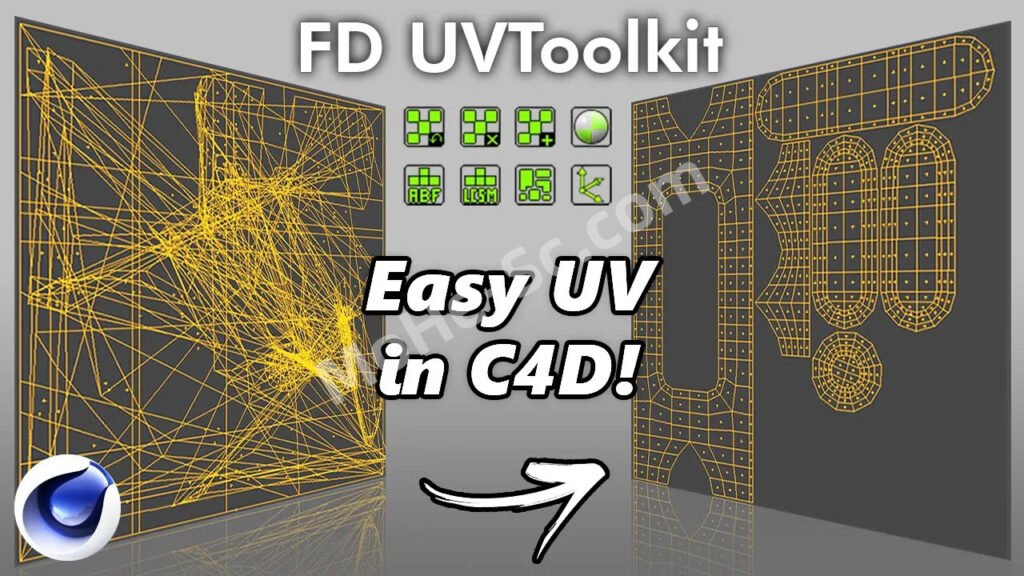
使用 FD UVToolkit,您无需进行大量设置来展开对象,只需三个简单的步骤即可展开对象:
- 选择对象并按“重置 UVW 标签”按钮。
- 选择您想要接缝的边缘。
- 单击“使用 LSCM 展开 UV”。
Instead of going through in a lot of settings to unwrap an object, with FD UVToolkit you just need three simple steps to unwrap it:
- Select the object and press “Reset UVW Tag” button.
- Select the edges you want the seams to be.
- Click “Unwrap UV with LSCM”.
付费资源
© 版权声明
文章版权归作者所有,未经允许请勿转载。
THE END
![关于本站启用[注册邀请码]的说明-MOHE素材库-设计行业的乐园,各类素材的矿山!](https://www.mohe-sc.com/wp-content/uploads/2022/10/2023_09xI0Dxg_-800x448.png)
![年底收官巨献,AIGC行业全平台设计工具网站正式上线,助力创作者突破创作瓶颈,开启高效创作之旅[已下线]-MOHE素材库-设计行业的乐园,各类素材的矿山!](https://www.mohe-sc.com/wp-content/uploads/2024/12/Ai.turnfish.top_-800x450.jpg)






![3ds Max迎来AI升级!MoHeTools For 3ds Max 2012 ~ 2026 智能工具箱插件发布,支持AI 3D建模、文生图、图生图、效果图生成,全面提升室内设计效率 [ 免费内测 ] !-MOHE素材库-设计行业的乐园,各类素材的矿山!](https://www.mohe-sc.com/wp-content/uploads/2026/08/3ds-Max迎来AI升级!MoHeTools智能工具箱插件发布,支持AI-3D建模、文生图、图生图、效果图生成,全面提升室内设计效率-800x450.jpg)




暂无评论内容