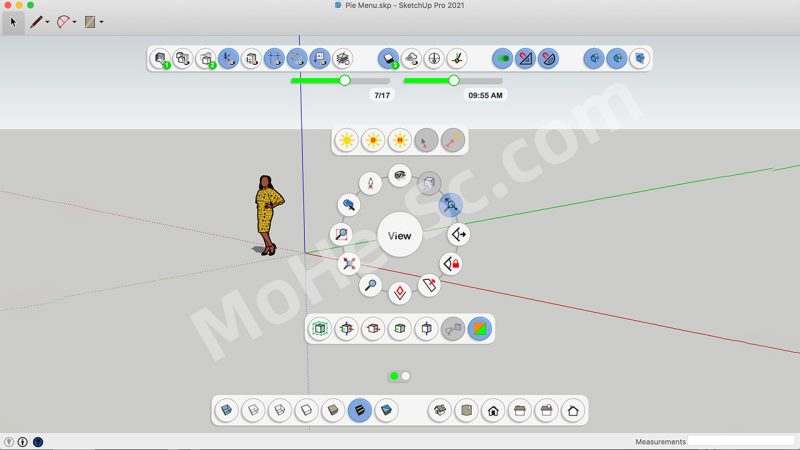



![图片[1]-草图大师圆盘菜单插件 Curic Pie Menu v1.2.0 For SketchUp 2020 ~ 2022](https://www.mohe-sc.com/wp-content/uploads/2025/08/Curic-Pie-Menu-v1.2.0-圆盘菜单-For-SketchUp-2020-2022-1024x576.jpg)
Curic 饼状菜单可创建可自定义的饼状菜单,直接显示在光标位置,从而帮助您在 SketchUp 中更高效地工作。
您可以添加原生命令和插件命令,将它们组织到多个菜单中,并使用数字键 (1-9) 快速触发命令。
在 1.4.0 版本中,我们添加了 Pin Docks——一种让工具栏始终显示在屏幕上的新方法。它基于 SketchUp 2023 的 Overlays API 构建,带来更简洁、更灵活的用户界面,尤其适用于 macOS。
简洁、强大,专为速度而生。
Curic Pie Menu helps you work faster in SketchUp by creating customizable pie-style menus that appear right at your cursor.
You can add native and plugin commands, organize them into multiple menus, and quickly trigger commands using number keys (1–9).
In version 1.4.0, we’ve added Pin Docks — a new way to keep toolbars always visible on screen. Built on SketchUp 2023’s Overlays API, this brings a cleaner, more flexible UI, especially useful on macOS.
Simple, powerful, and made for speed.
![图片[2]-草图大师圆盘菜单插件 Curic Pie Menu v1.2.0 For SketchUp 2020 ~ 2022](https://pic.turnfish.top/images/2025/08/05/Curic-Pie-Menu-v1.2.0--For-SketchUp-2020--2022-0.jpg)
付费资源
© 版权声明
文章版权归作者所有,未经允许请勿转载。
THE END
![年底收官巨献,AIGC行业全平台设计工具网站正式上线,助力创作者突破创作瓶颈,开启高效创作之旅[已下线]-MOHE素材库-设计行业的乐园,各类素材的矿山!](https://www.mohe-sc.com/wp-content/uploads/2024/12/Ai.turnfish.top_-800x450.jpg)









暂无评论内容